
Clicking "Options..." in the top right menu[ ] brings up a pop-up window where users can set options.
Database
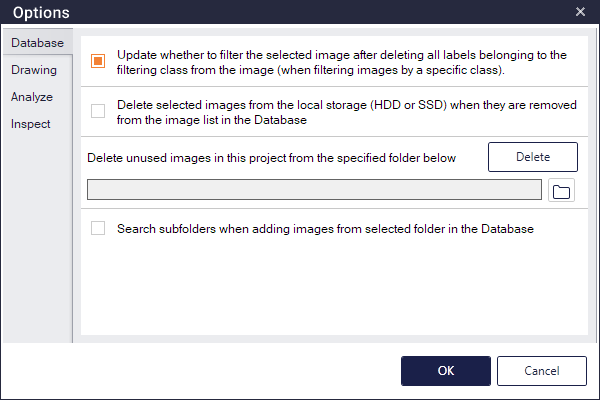
Image List Update
Update whether to filter the selected image after deleting all labels belonging to the filtering class from the image (when filtering images by a specific class) option determines whether to update or not filtering the selected image after deleting labels when filtering images by a specific class in the image list. If checked, the image is immediately filtered. If not checked, the image remains in the list.
Delete images when they are removed from the image list
Delete selected images from the local storage (HDD or SSD) when they are removed from the image list in the Database determines whether to delete or not the images from the local storage when they are removed from the image list in the Database. If checked, the images will be deleted. If not checked, the images will remain.
Delete Unused Images
By setting root folder to explore images (click the  , bottom right of
Delete unused images in this project from the specified folder below) and then clicking the  , images which are not used in this project will be deleted. This feature only works in Developer, not in Inspector or Generator.
Search subfolders when adding images from selected folder
Search subfolders when adding images from selected folder in the Database determines whether to search subfolders of selected folder or not when adding images by designating folder in the image list of Database.
Drawing
Eraser Tool Type
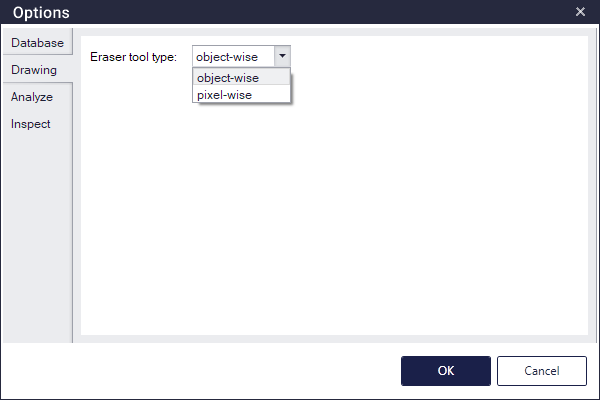
Users can set the eraser tool type of the Segmentation and Image Generation modes. When set to object-wise, the eraser tool removes all labels that overlap the area drawn by the eraser tool even partially. When set to pixel-wise, the eraser tool only erases the area drawn by it.
Analyze
Correctness threshold
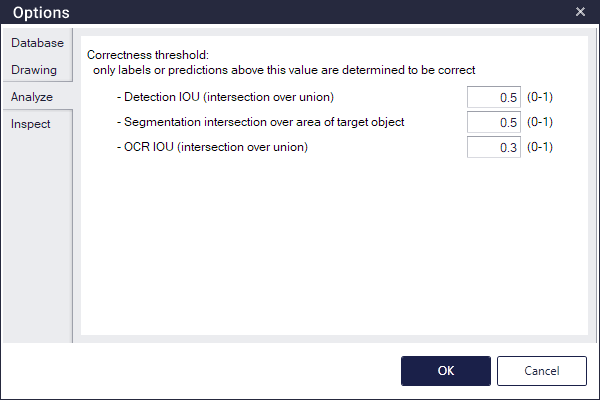
In the Analyze tab of Detection, Segmentation, and Optical Character Recognition mode, users can adjust a correctness threshold, which determines whether the inspection is correct by comparing the actual label area to the detected area. The actual labels or predictions above the set value are determined to be correct.
- Detection: It is an IOU (intersection over union) value between the actual label and detected one, which is calculated as "(area of intersection) / (area of union)".
- Segmentation: In the case of the actual label, it is calculated as "(area of intersection between the actual label and detected one) / (area of the actual label)". In the case of the detected label, it is calculated as "(area of intersection between the actual label and detected one) / (area of the actual label)".
- Optical Character Recognition: It is an IOU (intersection over union) value between the actual label and detected one, which is calculated as "(area of intersection) / (area of union)".
Inspect
Delete images when they are removed from the image list
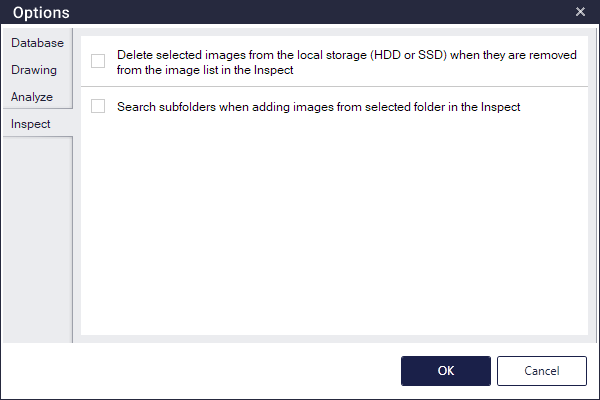
Delete selected images from the local storage (HDD or SSD) when they are removed from the image list in the Inspect determines whether to delete or not the images from the local storage when they are removed from the image list in the Inspect. If checked, the images will be deleted. If not checked, the images will remain.
Search subfolders when adding images from selected folder
Search subfolders when adding images from selected folder in the Inspect determines whether to search subfolders of selected folder or not when adding images by designating folder in the image list of Inspect.