콘텐츠로 이동

AnomalyDetection.h

Go to the source code of this file.

Anomaly Detection은 정상 이미지만을 가지고 학습하여 비정상 이미지와 해당 영역을 검출하는 기능입니다.

SAIGE VISION에서는 Anomaly Detection의 비정상 영역을 SaigeSegmentedObject 구조체, 즉 Contour 형태로 검출합니다. 따라서, Segmentation 기능과 유사하며 추가적으로 비정상 이미지 여부와, 이미지 전체의 비정상 점수를 제공합니다.

추론 옵션

Anomaly Detection 의 추론 결과인 Mask, Object, 그리고 Heatmap을 계산 여부를 설정할 수 있습니다. Scoremap은 기본적으로 계산되며, 계산하지 않도록 설정할 수 없습니다.

143
144
145
146
147
148
149
150
151
152
153
154
155
156
157
158
159
160
161
162
// ExampleIADRuntime.cpp:145

options->calcScoremap = true;
options->calcHeatmap = true;
options->calcMask = true;
options->calcObject = true;
options->calcObjectAreaAndApplyThreshold = true;
options->calcObjectScoreAndApplyThreshold = true;
unsigned int flags = SAIGE_SET_CALC_SCOREMAP | SAIGE_SET_CALC_HEATMAP |
                     SAIGE_SET_CALC_MASK | SAIGE_SET_CALC_OBJECT |
                     SAIGE_SET_CALC_OBJECT_AREA_AND_APPLY_THRESHOLD |
                     SAIGE_SET_CALC_OBJECT_SCORE_AND_APPLY_THRESHOLD;
retval = SaigeSetInferenceOption(handle, options, flags);
if (retval < 0) {
    std::cerr << "SaigeSetInferenceOption() failed - " << SaigeStrError(retval)
              << std::endl;
    SaigeDestroyInferenceHandle(handle);
    SaigeDestroyInferenceResult(result);
    return retval;
}

See also:

Heatmap

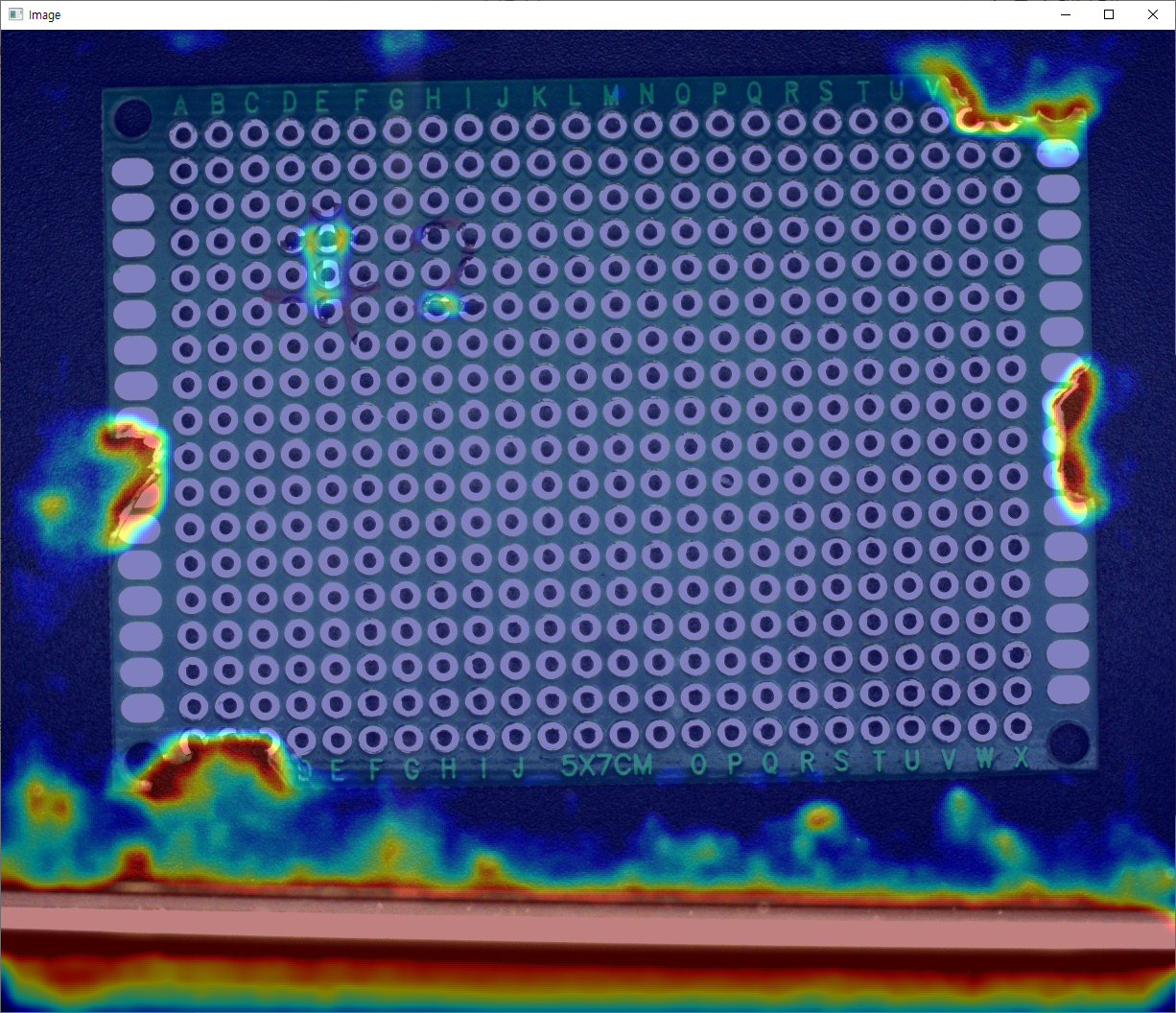
Anomaly Detection에서는 Scoremap을 Heatmap으로 색상을 입힐 수 있습니다. Anomaly Detection의 Score는 다른 기능과는 다르게 0 이상의 실수 자료형으로 표현됩니다. 따라서 색상 영역에 대응되는 Score 최대, 최소값을 설정할 수 있습니다. 학습된 모델에는 적당한 Score 범위를 계산하여 이미 설정되어있으나, 뚜렷하게 보이지 않는 경우에 범위를 조정할 수 있습니다.

182
183
184
185
186
187
188
189
190
191
192
193
// ExampleIADRuntime.cpp:184

options->heatmapColorRangeMin = 1.0;
options->heatmapColorRangeMax = 2.5;
retval = SaigeSetInferenceOption(handle, options, SAIGE_SET_HEATMAP_COLOR_RANGE);
if (retval < 0) {
    std::cerr << "SaigeSetInferenceOption() failed - " << SaigeStrError(retval)
              << std::endl;
    SaigeDestroyInferenceHandle(handle);
    SaigeDestroyInferenceResult(result);
    return retval;
}
  • 변경 전

Image

  • 변경 후

Image

See also: SaigeInferenceOption::heatmapColorRangeMin, SaigeInferenceOption::heatmapColorRangeMax

추론 결과

Anomaly Deetection의 기본 추론 결과로 isNg, anomalyScore, scoreMin, scoreMax를 받아올 수 있습니다.

288
289
290
291
292
293
294
295
296
297
298
299
300
301
302
303
304
305
306
// ExampleIADRuntime.cpp:290

// DEFAULT
retval = SaigeGetInferenceResultAnomalyScores(result, &anomalyScore, &scoreMin, &scoreMax);
if (retval < 0) {
    std::cerr << "SaigeGetInferenceResultAnomalyScores() failed - " << SaigeStrError(retval)
              << std::endl;
    SaigeDestroyInferenceHandle(handle);
    SaigeDestroyInferenceResult(result);
    return retval;
}
retval = SaigeGetInferenceResultIsNg(result, &isNg);
if (retval < 0) {
    std::cerr << "SaigeGetInferenceResultIsNg() failed - " << SaigeStrError(retval)
              << std::endl;
    SaigeDestroyInferenceHandle(handle);
    SaigeDestroyInferenceResult(result);
    return retval;
}

See also: SaigeGetInferenceResultAnomalyScores, SaigeGetInferenceResultIsNg

ScoremapIAD

Anomaly Detection의 추론 결과인 Scoremap은 0 이상의 실수를 표현하도록 float 배열로 표현됩니다.

333
334
335
336
337
338
339
340
341
342
343
344
345
346
// ExampleIADRuntime.cpp:335

retval = SaigeGetInferenceResultScoremapIAD(result, &scoremap);
if (retval < 0) {
    std::cerr << "SaigeGetInferenceResultScoremapIAD() failed - "
              << SaigeStrError(retval) << std::endl;
    SaigeDestroyInferenceHandle(handle);
    SaigeDestroyInferenceResult(result);
    return retval;
}
if (verbosity >= 4) {
    SaigeShowImage(scoremap, w, h, 1, SaigeImageType::SV_F32, false, false,
                   1 / scoreMax, waitkeyMilliSecond);
}

See also: SaigeGetInferenceResultScoremapIAD 그 밖에 Mask, Object, Heatmap 등의 결과는 예제 코드 및 API 문서를 참고하기 바랍니다.

See also: SaigeGetInferenceResultMask, SaigeGetInferenceResultSegmentedObject, SaigeGetInferenceResultHeatmap