SaigeVision ImageProcess Installation
준비물
| 항목 | 위치 |
|---|---|
| Engine Dynamic Library | - opencv_world420.dll - SaigeImageProcess.dll - SaigePhotometricStereo.dll - SaigePhotometricStereo_Impl.dll |
| .Net Dynamic Library | - SaigeVision.ImageProcess.dll - SaigeVision.ImageProcess.Core.dll - SaigeVision.ImageProcess.Deep.dll - SaigeVision.ImageProcess.Deep.Core.dll - SaigeVision.ImageProcess.Utilities.dll |
| 압축파일 | SaigePhotometricStereo.zip |
설치
압출 파일을 설치 경로에 아래와 같은 구조가 되도록 압축 해제합니다.
- 설치 경로 예시:
C:\Saige\
C:\Saige\SaigePhotometricStereo
└ DLL
└ Examples
└ python
└ lib
└ include
└ module
Warning
디렉토리 이름 SaigePhotometricStereo, python, module 세가지 경로는 변경 불가합니다.
환경변수 설정
- 방법 1 - 윈도우 검색창에 “시스템 환경 변수 편집” 검색
- 방법 2 - 제어판 → 시스템 → 고급 시스템 설정
- 방법 3 - 실행 (Win+R) →
sysdm.cpl ,3→ 확인
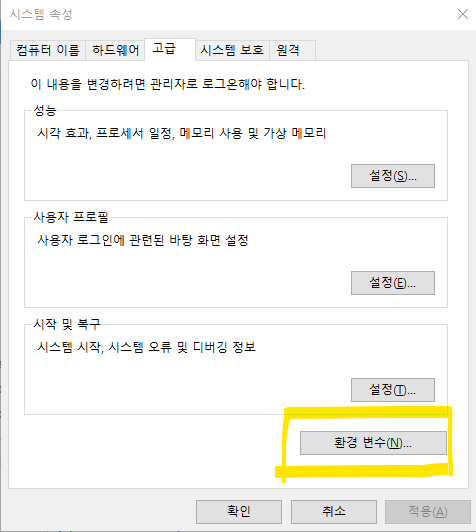
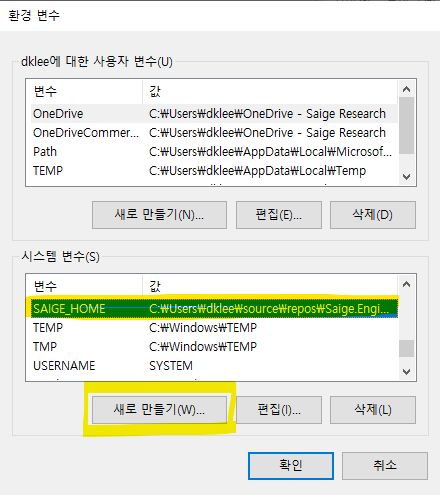
시스템 변수 → 새로 만들기
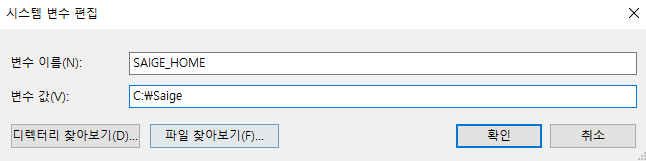
→ 변수 이름: SAIGE_HOME
→ 변수 값: 위의 설치 경로. 여기서는
C:\Saige로 설정합니다. (끝의 백슬래시₩는 제외)→ 확인
SaigeVision ImageProcess Library 사용 방법
실행하려는 경로에 Engine Dynamic Library dll 파일들을 위치시킵니다.
(ex. bin\x64\Debug*Engine Dynamic Librarys*).Net Dynamic Library dll 파일들을 참조에 추가합니다. SaigeImageProcess.dll: rule-based 처리를 위한 dll (지원하는 기능 FindCircle, FindLine, Synthesis) SaigeImageProcess.Core.dll: rule-based 처리를 위하여 Core 기능 SaigeImageProcess.Deep.dll: Photometric Stereo 처리를 위한 dll SaigeImageProcess.Deep.Core.dll: Photometric Stereo 처리를 위한 Core 기능
필요에 따라 2개 (name.dll, name+Core.dll) 를 한쌍으로 참조하여 사용할 수 있습니다.